We will be teaching First Grade how to add and subtract whole numbers.
Lesson Plan
Friday, November 14, 2014

Sunday, November 9, 2014
Blog Post #12
Blog Post #12 Collaborative Group #4
A. This video is just about introducing what Assistive Technology is and why it is important to have the classroom. For example, you could have a blind child in the classroom and as a result they will require a different approach to learning. They are just as smart and able and their able-bodied counterparts. They just need a different kind of help.
By: Sterling Spencer
B. Apple has a range of technological options to help those who have disabilities live their lives to the fullest with their technology.
For the users with vision problems the “Voice Over” will read the screen to them. For those with hearing problems they can access the “Face Time” feature on the phone and can then converse with people face to face. For the users who have diminishing motor skills can utilize the “AssistiveTouch” features in the IOS. The IOS also has features to assist those with attention deficit or cognitive disabilities stay on task.
By: Sterling Spencer
- The Mountbatten brailler is introduced to be a way to incorporate the blind into the classroom curriculum. This device allows the student to type what he or she is trying to say and the device prints the message in braille and reads the message back to the student in the process. The Mountbatten saves files and is able to transfer and receive files from the computer. This gives the blind an opportunity to achieve all academic goals they have set for themselves.
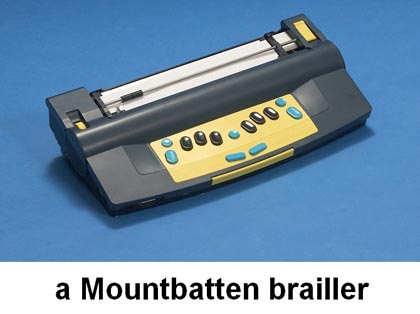
By: Paula Holt
- Technology never ceases to amaze me!! In Teaching Math to the Blind, Professor Karshmer discusses the difficulties of teaching math to the blind while he demonstrates how to use his innovative device that will make it simple and easy to teach math to the visually impaired.
For sighted children, it is very easy to explain a math problem on the board because
they can see how the numbers line up vertically. They then can add/subtract/divide/
multiply accordingly. But for blind students, Braille does not line up just so. Their
numbers stay linear and they can only read them from left to right. This makes math way
harder for them to figure out. But with Professor Karshmer’s device, students can scan
numbered tiles which tells them what number each tile is. They then can place it
anywhere on the board and line up tiles to make problems easier for them to feel
and figure out. Such a simple creation but it has a remarkable impact on it’s particular set
of students. I personally have a very close friend who is blind and just from talking to
him I know that it is extremely difficult to get a job if you are blind. With math skills your
chances increase drastically. That’s why technology is such a huge must for students
with special needs.
- Another more familiar piece of technology that is becoming increasingly important for the blind is the Ipad. It’s so refreshing to see something so popular being put to good use
done! Using the Ipad for the blind is simple and so easy for them to hear and understand
what they are doing while they are using their Ipad. This opens so many doors for them.
Now they can create and store all kinds of information and easily access it without any
outside help. I know that there are other forms of technology that have been made
accessible for the blind, but according to my friend who is blind, most of these devices
are very expensive. An Ipad isn’t cheap but it is attainable. It is also being used more
and more in schools. This gives special needs teachers an easy tool to interact with
with their blind students and give them a chance to feel in control! By: Taylor Gray
- Denise shows us how learning on the ipad is simple and easy for someone who is blind. By simply running your finger over the screen the ipad tells you what app or program you are about to click on. It is set to double tap, so when you are over the app you need you can double tap anywhere on the screen and it opens the app. The keyboard is the same way making it easier to send messages for someone who can only hear. This is a great tool for a blind person to communicate with the world. I feel this is a great aspect and will go a long way for the people who simply can’t see, but have all the dreams just like the ones of people with vision.
By: Paula Holt
Special Education isn’t for everyone. It takes a calm, cool, collected, organized , and confident person to work with the special needs. Teaching can become overwhelming, so it is great to have a variety of options in your PLN. Working with parents and other teachers can offer many new ideas to help the special needs. Jeff Dunn has created an article 50 Must-See Blogs For Special Education Teachers. This article provides 50 blogs for you to add into your PLN. Jeff has broke them down into different groups making them easier to find what you need. Special Education Teaching Tips and Strategies, Technology and Assistive Technology, Special Topics, Special Education News and Policy, Special Education Law, and Various Topics on Special Education. Expanding your PLN allows you access to many ideas you can incorporate in your lesson plans.
Thursday, November 6, 2014
c4t #3
http://teachhighschoolmath.blogspot.com/2013/04/have-students-teach-class-student.html
The student engagement wheel is introduced. When you teach your students something and they know the material and can use it gives students excitement that they can teach their classmates. The student engagement wheel describes different parts of how students should be engaged with each other and you.
my comment:
I am a student in EDM310 at USA. I love the student engagement wheel. I love getting everyone involved and making the learning process easy as possible. Students are more inclined to learn material from their peers. A student myself I have always learned material I struggled with from my classmates. Different styles of teaching from those who are just students.
<a href="http://holtpaulaedm310.blogspot.com">Paula Holt</a>

The student engagement wheel is introduced. When you teach your students something and they know the material and can use it gives students excitement that they can teach their classmates. The student engagement wheel describes different parts of how students should be engaged with each other and you.
my comment:
I am a student in EDM310 at USA. I love the student engagement wheel. I love getting everyone involved and making the learning process easy as possible. Students are more inclined to learn material from their peers. A student myself I have always learned material I struggled with from my classmates. Different styles of teaching from those who are just students.
<a href="http://holtpaulaedm310.blogspot.com">Paula Holt</a>
Sunday, November 2, 2014
Project #14 Group #4
Calendar
Lesson Plan
Rubric
Sample Project
Group #4 lesson is to turn music lyrics into proper English.

Lesson Plan
Rubric
Sample Project
Group #4 lesson is to turn music lyrics into proper English.
Thursday, October 30, 2014
Blog Post #11
Brian Crosby, a teacher from Nevada, talks about how he uses technology in the classroom with back to the future. Every student has a blog. Instead of the standard 20 question test, Crosby asks the students to embed the video into their blog and give an explanation. He asks the students to set goals for themselves. While the students also build a learning network to collaborate with one another. Celeste, a student with Leukemia, attends class everyday through Skype or a similar application. This allows her to be a normal student while at home fighting cancer.
Mr. Paul Anderson describes for us what blended learning is for us. He describes that online, mobile, and classroom is mixed with the learning cycle which is engage, explore, expand, explain, and evaluate. Blended learning cycle is the combination of both. Allowing the students to grade each others work and get involved allows for more learning. Anderson talks about having a good question, investigate, video, collaboration, review, and summary quiz. He uses the method for students to better understand the material with the blended learning cycle.
Same Pane shows us what it takes to be a super digital citizen. He demonstrates what it takes to be a good digital citizen. A digital citizen chooses to act safely, respectful, and show responsibility. Pane reminds the students to not give out any information to strangers on the internet. Using a website the students are able to design and create their own digital citizen. After creating this the students must write a narrative while building a comic of a digital citizen saving the day from people not being careful while using the internet. This allows the students to write narratives, analyze how visual and multimedia elements contribute to text, and ask and answer questions.
In this video, project based learning describes using projects because it increases engaged learners. It gives the students a deeper understanding of the material. Students use technology as a tool to bring the content to life.
PBL program at Roosevelt Elementary provides a video explanation of PBl. Using project based learning allows students to show they fully understand the concept. This also encourages public speaking skills. Starting the student at a young age with public speaking will eliminate this fear as the student ages. It allows the students to make decisions and form presentation.
Making thinking visible is also a book that deepens the minds of students while deepening the depth of understanding.

Mr. Paul Anderson describes for us what blended learning is for us. He describes that online, mobile, and classroom is mixed with the learning cycle which is engage, explore, expand, explain, and evaluate. Blended learning cycle is the combination of both. Allowing the students to grade each others work and get involved allows for more learning. Anderson talks about having a good question, investigate, video, collaboration, review, and summary quiz. He uses the method for students to better understand the material with the blended learning cycle.
Same Pane shows us what it takes to be a super digital citizen. He demonstrates what it takes to be a good digital citizen. A digital citizen chooses to act safely, respectful, and show responsibility. Pane reminds the students to not give out any information to strangers on the internet. Using a website the students are able to design and create their own digital citizen. After creating this the students must write a narrative while building a comic of a digital citizen saving the day from people not being careful while using the internet. This allows the students to write narratives, analyze how visual and multimedia elements contribute to text, and ask and answer questions.
In this video, project based learning describes using projects because it increases engaged learners. It gives the students a deeper understanding of the material. Students use technology as a tool to bring the content to life.
PBL program at Roosevelt Elementary provides a video explanation of PBl. Using project based learning allows students to show they fully understand the concept. This also encourages public speaking skills. Starting the student at a young age with public speaking will eliminate this fear as the student ages. It allows the students to make decisions and form presentation.
Making thinking visible is also a book that deepens the minds of students while deepening the depth of understanding.
Saturday, October 25, 2014
Blog Post #10
Ms.Cassidy provides a video of how her first graders use technology here. This video lets the students walk us through some of the technology based assignments used in their classroom. They use logging to help improve their writing and reading skills. This also gives the students encouragement to keep writing. Ms. Cassidy provides a webpage the students can access links to games and Ms. Cassidy's blog. They also use wikis, Skype, and nintendo d.s. to collaborate in the classroom.
I love the idea of blogging in the classroom. This allows the students to improve their reading and writing skills without actually knowing. This gives them confidence when their peers leave comments on a post. It lets the student know that they can write and to keep trying. In my classroom I will have a class webpage that has assignments, links. and anything I can find that pertains to the curriculum. I want my students to have 24/7 access to information they need to help them be a better student and prepared for class.
Technology in the classroom has so many benefits. It not only allows the children to learn at school but they have access from almost anywhere with a laptop to learn. Having an audience is very beneficial because the student is not only writing for the teacher, but they are writing for their peers as well. The class page as mentioned above allows the student access all the time. They can see what was missed if they are absent. It provides links to learning websites.
During interview #3 Cassidy talks about having the students create a school Facebook page. I really liked this idea. This allows the students to be updated and have another resource to get in touch with classmates. You can also find interview #1 and interview #2 where Cassidy talks about technology in her classroom.

I love the idea of blogging in the classroom. This allows the students to improve their reading and writing skills without actually knowing. This gives them confidence when their peers leave comments on a post. It lets the student know that they can write and to keep trying. In my classroom I will have a class webpage that has assignments, links. and anything I can find that pertains to the curriculum. I want my students to have 24/7 access to information they need to help them be a better student and prepared for class.
Technology in the classroom has so many benefits. It not only allows the children to learn at school but they have access from almost anywhere with a laptop to learn. Having an audience is very beneficial because the student is not only writing for the teacher, but they are writing for their peers as well. The class page as mentioned above allows the student access all the time. They can see what was missed if they are absent. It provides links to learning websites.
During interview #3 Cassidy talks about having the students create a school Facebook page. I really liked this idea. This allows the students to be updated and have another resource to get in touch with classmates. You can also find interview #1 and interview #2 where Cassidy talks about technology in her classroom.
Subscribe to:
Posts (Atom)